Cards & Payments
How to Pay for International Subscriptions With One Virtual Card
Netflix declined. ChatGPT declined. Then Spotify declined too. If your card failed at three different checkouts this month, that’s not a coincidence. Almost every subscription people pay for each month bills from another country through a foreign processor. We’ve covered ChatGPT on its own in a separate guide. Here we’re covering how to pay for international subscriptions in general, so you’re not hunting for a new workaround every time you sign up.
Why local cards get declined for almost every international subscription
International services charge in dollars or another foreign currency through a processor based abroad. Usually that’s the US, Ireland, or Singapore. Banks often block cross-border charges automatically as a security measure. This is especially true if your card has never been used for an international payment before. Plenty of local debit cards also aren’t enabled for cross-border online payments in the first place. The result is always the same: ”your card was declined,” even with plenty of money sitting in the account.
Even when the charge does go through, there’s usually a 2-4% currency spread quietly added to the bill. A subscription that should cost $10 a month can land closer to $10.30-$10.40, with nothing on the receipt explaining why.
The real problem: a different workaround for every subscription
Because local cards fail so often, people end up patching together a separate solution for each service. Netflix runs on a sibling’s credit card. ChatGPT Plus gets paid through a friend who holds USDT. Spotify gets covered with a gift card bought on a marketplace at a 10-15% markup over face value. Each workaround has its own renewal date, and keeping track of who owes what this month gets messy fast.
The trouble shows up the moment one workaround falls through. A friend forgets to send USDT on time, and ChatGPT Plus quietly drops back to the free tier in the middle of something important. Google One lapses because a sibling’s card hit its limit, and there’s suddenly no room to upload or share files until it’s paid again. Juggle four workarounds across four subscriptions, and one is bound to fail eventually. When it does, patching together a fix usually takes two or three days, plus that 10-15% markup if a gift card has to be repurchased in a hurry.
The simplest fix: how to pay for international subscriptions with one card
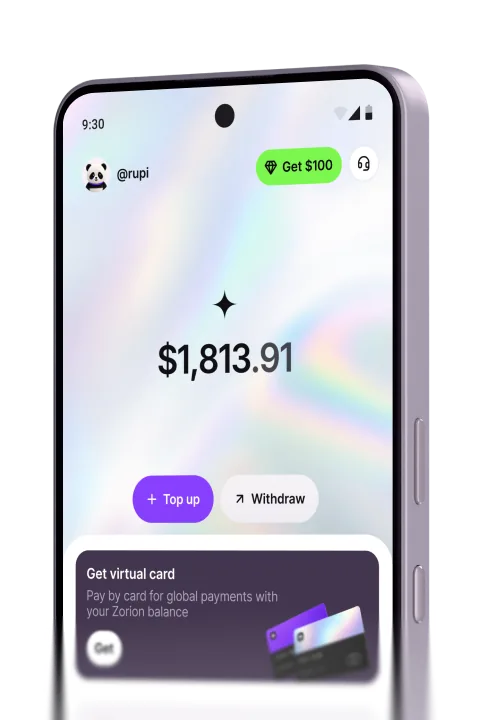
A virtual card is built specifically for online and international payments. That’s why it gets accepted smoothly by Netflix, ChatGPT, Spotify, and services like them. You create it in an app, top it up, and use that same card for every subscription. No plastic, no bank visit. For the full explainer on how it works, see what a virtual debit card is.
Subscriptions one virtual card usually covers
A single virtual card is usually enough for nearly every subscription that bills from abroad. That includes streaming services like Netflix, Disney+, YouTube Premium, and HBO Max, or music apps like Spotify and Apple Music. It also covers AI tools like ChatGPT, Claude, and Midjourney, plus work software like Canva, Adobe, Notion, and Figma. Gaming platforms like Steam, PlayStation Plus, and Xbox Game Pass fit too, along with cloud storage like iCloud and Google One. The full breakdown by category lives on our subscriptions hub.
How to pay for international subscriptions step by step
Leave a little extra balance beyond the listed price: some services place a small temporary hold before charging the real amount.
Tips to stop declines before they happen
Top up more than the subscription costs, and keep a 5-10% buffer for whatever the currency spread adds on billing day. Match the billing country to whatever your card app shows. Some services check that it lines up with your account’s country. For anyone who wants tighter control, a separate virtual card per subscription helps. It makes it easy to see at a glance what’s active and what needs a top-up this month.
Common mistakes that cause failed renewals
The most common mistake is topping up the exact amount owed with no buffer. The charge then fails on billing day over a currency spread that was entirely avoidable. Another is waiting until the last day to top up, when some services actually attempt the charge a few days before the real due date. Plenty of people also hand their virtual card number to someone else to ”help pay it.” That really just means handing over direct access to that balance. And the mistake people notice too late: a subscription lapses for days before anyone checks the email the service sent about it.
Frequently asked questions
Pay for every international subscription with one Zorion card
Instead of running four different workarounds for four subscriptions, pick one that works for all of them. That’s how to pay for international subscriptions without the runaround: one virtual card. Zorion gives you a free virtual card that works on Netflix, Spotify, ChatGPT, and dozens of other services. Just top it up with a buffer, and a subscription won’t lapse again because a card got declined. Anyone can sign up and try it today.
Keep reading
Zorion vs Kast: Is a $1,000+/Year Crypto Card Membership Worth It?
Your balance sits in USD, ready to spend on a virtual card the next time a subscription or an online
Zorion vs Oobit: Do You Need Your Own Crypto Wallet First?
You want to spend it on Netflix or ChatGPT. You search zorion vs oobit because both names keep showing up together. Before
Zorion vs RedotPay: Free Virtual Card or Pay $10-$100 First?
You just cashed out your winnings from a trading platform, converted to USDT, and now you’re looking for a way to spend that balance on international services —…